

Keep your Brand Space secure by enabling password protection. This feature ensures that only people with the password can access your brand, even if they have the link. Ideal for sharing with clients or external collaborators while maintaining full control over who sees your content.
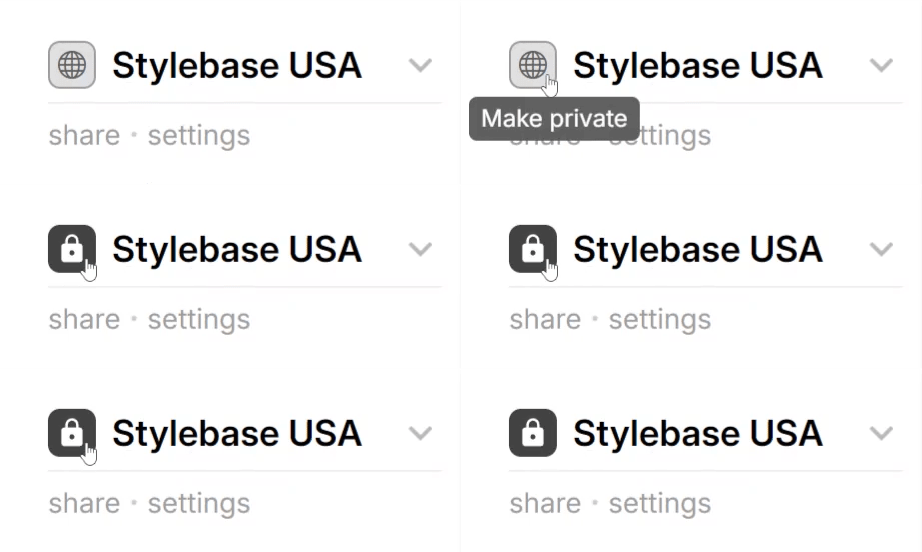
Step 1: Set Your Brand Space to Private
- Navigate to your Brand Space.
- Click on the privacy icon next to your Brand Space name.
- The icon will switch to a lock, indicating that the Brand Space is now private.
Step 2: Open the Share Menu
- Click the Share button right below the Brand Space.
- The Share Brand popup will appear.
Step 3: Access the Password Protected Link
- In the popup, scroll to the Password Protected Link section.
- You’ll see a unique shareable link and an automatically generated password.
- Click Copy Link & Password to copy both to your clipboard.
- Or click Send as Email to directly email the link and password.
Step 4: Share with Confidence
- When someone opens the link, they’ll be prompted to enter the password.
- This feature helps keep confidential branding material protected from unauthorized access.