

Imagine a website where every topic feels scattered. You click through endless blog posts, unsure where to start or how one piece connects to another. That chaos doesn’t just frustrate users, it hurts your SEO too.
That’s where pillar pages come in.
A well-structured pillar page is the backbone of an organized, SEO-friendly website. It brings together all your content around a broad topic in one central hub, making it easier for readers and search engines to navigate your knowledge base.
But what does a good pillar page look like in action?
In this blog, we’ll explore the anatomy of a successful pillar page and walk you through 10 real examples that nail both user experience and SEO. These examples, from SaaS giants to media brands, show exactly how you can create content that’s helpful, organized, and built to rank.
Whether you’re a content marketer, a designer, or building your brand playbook, these pillar page examples will spark ideas for your next big piece.
What Is a Pillar Page?
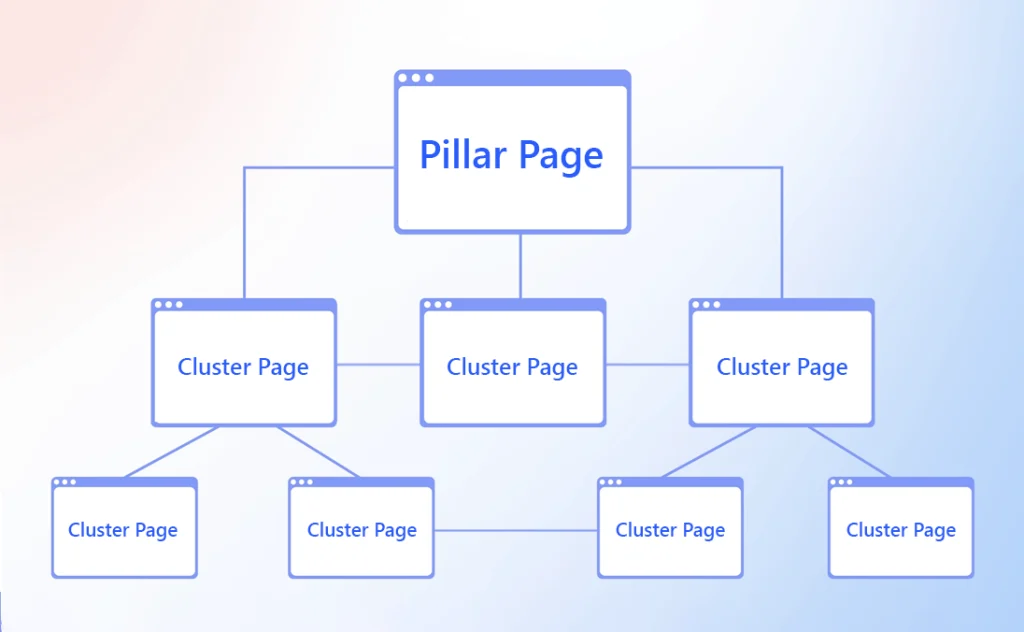
A pillar page is a long-form, comprehensive piece of content that serves as the central hub for a specific topic. It links to smaller, related pages, called cluster content, that explore subtopics in more depth.
Think of it as a main directory.
Let’s say you run a wellness blog. Your pillar page might be “Beginner’s Guide to Yoga.” That page would then link to cluster posts like “Yoga Poses for Back Pain,” “Best Yoga Mats,” and “How to Start a Daily Yoga Routine.”
All those cluster posts also link back to the main pillar.
This internal linking structure helps search engines understand your site hierarchy and makes it easier for visitors to find everything they need in one place. It’s like building a mini knowledge library that’s easy to explore.
Unlike landing pages or product pages, a pillar page is not focused on sales. Its main goal is education, visibility, and discoverability.
Benefits of Pillar Pages for SEO and UX

Pillar pages are a win for both search engines and your audience. Here’s why:
1. Higher Search Rankings
By covering a topic broadly, you target short-tail keywords and increase your chances of ranking for hundreds of related search terms.
2. More Backlinks
High-quality pillar pages are often seen as valuable resources and earn backlinks from other websites. This strengthens your domain authority.
3. Better User Experience
A structured, scannable page keeps readers engaged. They find what they’re looking for quickly and are more likely to explore related content.
4. Lower Bounce Rates
When people stay on your site longer, thanks to organized content, they’re more likely to convert or return.
5. Stronger Content Strategy
Creating a pillar page forces you to map out all the angles of a topic, which helps build a consistent and scalable content strategy.
In short, a good pillar page builds trust with users while signaling relevance and depth to search engines.
What Makes a Great Pillar Page?
Not every long post qualifies as a pillar page. To truly work, it must have the following qualities:
1. Clear Topic Scope
The topic should be broad enough to include multiple subtopics but focused enough to stay relevant throughout.
2. Ungated Content
Keep the content open and accessible. Don’t lock the pillar page behind a form. Use downloadable content (like PDFs) as a bonus instead.
3. Smart Internal Linking
Use clear anchor text and link to supporting blog posts, videos, tools, or templates. These cluster pages must also link back to the pillar page.
4. Table of Contents
Let users jump to the section they care about. A sticky or floating table of contents improves navigation.
5. Readability
Use subheadings, short paragraphs, visuals, and bullet points to break up text.
6. Strong Introduction
Set the stage with a compelling introduction that shows why this topic matters.
7. Optimized for SEO
Target a core keyword and use long-tail variations naturally. Meta descriptions, alt tags, and headers should all follow best practices.
Best Pillar Page Examples with Takeaways
This section highlights outstanding pillar page examples, showing how brands create content hubs that boost SEO, organize detailed cluster blog posts, and offer a better experience for readers.
Each example includes a detailed analysis of structure, user flow, content strategy, and internal linking. These are all essential for any content marketer building their own pillar page strategy.
Hootsuite – Social Media Marketing Strategy Guide
Hootsuite’s guide is a strategic overview for marketers creating a social media presence from scratch. The content flows through goals, metrics, and platform tips in a logical order.
What Makes It Great
- Starts with a clear overview and a table of contents
- Covers the broad topic of social media but includes in-depth content clusters
- Uses branded templates and video links to increase engagement
- Each chapter includes external links and tool suggestions
- Optimized with keyword-rich headers and internal links to platform-specific guides
Takeaway
This resource pillar page shows how pillar content can support users at multiple skill levels. New marketers find structure, while advanced readers explore deeper through related blog articles and toolkits.
HubSpot – The Ultimate Guide to Productivity Apps
Part of HubSpot’s content cluster model, this pillar page outlines top productivity apps for teams, individuals, and remote workers. It’s designed to serve as the content hub for various related topics.
What Makes It Great
- Structured with a sticky table of contents for easy navigation
- Includes internal and external links to tool reviews and supporting content
- Features embedded CTAs and lead magnets
- Built on a blog-style layout with optimized schema
- Each sub-section aligns with a specific keyword related to productivity
Takeaway
This pillar page doubles as a lead generation asset while ranking well in search. It’s a great model for blending pillar content with business outcomes like downloads and product trials.
Typeform – Brand Awareness
Typeform’s brand awareness guide is part educational content, part visual storytelling. It’s positioned as a nearly complete resource on the topic and supports their brand personality through clean design.
What Makes It Great
- Beautiful layout with muted colors and large fonts
- Internal links lead to cluster pages like survey tools, brand tracking, and campaign tips
- Includes tweetable quotes and social sharing options
- Each section is short and easy to scan
- The flow moves naturally from definition to strategy and case studies
Takeaway
Your pillar page doesn’t have to be heavy or formal. This example proves that minimalist design and strong internal linking can create an excellent pillar page that still drives traffic and trust.
Zapier – Systems Management 101: An Ultimate Guide
This page breaks down systems management for teams looking to streamline processes using automation. It balances depth and accessibility with plain language and design-friendly formatting.
What Makes It Great
- Includes a prominent callout box for each section
- Links to internal Zapier guides and workflow templates
- Chapters are organized by use case and audience
- Uses plain language and clear examples
- Encourages deeper exploration with related articles
Takeaway
An excellent pillar page not only connects existing content but drives visitors to take action. Zapier’s smart linking, visual aids, and use-case organization make this a strong reference model.
Semrush – What is SEO? (Fluff-Free Definition)
Semrush offers a direct, no-jargon explanation of SEO with real-world examples and glossary support. The goal is to demystify a technical topic while improving the site’s authority for search engine terms.
What Makes It Great
- Structured to answer beginner questions right at the top
- Includes external links to Google resources and definitions
- Uses internal links to detailed blog posts on local SEO, technical SEO, and keyword research
- Clean layout with collapsible FAQs
- Clear CTA at the end to explore toolkits and reports
Takeaway
This is a great pillar page for those aiming to become the go to resource in their niche. Answering real user questions in a conversational tone helps with ranking and trust.
Moz – Beginner’s Guide to SEO
Moz’s legendary Beginner’s Guide to SEO is a go-to resource for marketers, students, and businesses new to search engine optimization. This content pillar page breaks SEO into multiple chapters that cover everything from how search engines work to link building.
What Makes It Great
- Chapters are organized like a book with forward and backward navigation
- Each section links to deeper blog articles and cluster content
- Glossary and visuals help explain technical concepts
- Clean site structure and clear typography support reading flow
- The guide remains ungated and freely accessible
Takeaway
Not all pillar pages need to sell. Some, like Moz’s, focus entirely on educating and building long-term trust. This guide is a prime example of how to turn educational content into a high-performing traffic engine.
Databox – Sales Analysis Reports
Databox’s guide to sales reporting outlines how to track performance using dashboards and KPIs. It’s both educational and product-led, showing how their tool helps with data visualization.
What Makes It Great
- Strong intro with keyword-focused H1 and subheading
- Links out to blog posts and client stories for more depth
- Table of contents supports fast navigation
- Callout boxes summarize key takeaways
- CTA offers dashboard templates for readers to try
Takeaway
This example proves that a resource pillar page can double as a product education page. Use content as the entry point, then layer in tool-specific value for conversions.
Trello – How to Embrace Remote Work
Trello built this pillar page to guide teams through remote collaboration. It reads more like a digital book with chapters, expandable sections, and visual storytelling.
What Makes It Great
- Sticky table of contents keeps users grounded
- Chapters include a short summary before expanding
- Internal links send readers to related tools and user stories
- Supports different reading styles (skimmers vs deep readers)
- Promotes Trello templates subtly within the content
Takeaway
This is a great pillar page example for remote work topics or long-form education. It shows how to structure content for different attention spans while still guiding the user journey.
Alloy – Digital Banking Strategy
Alloy’s page walks banking professionals through the steps of modernizing customer experience using technology. It ties together blog content, webinars, and case studies into one central hub page.
What Makes It Great
- Clear introduction explaining the page value
- Well-formatted with visuals, charts, and process flows
- Uses internal links to cluster content on compliance, onboarding, and fraud prevention
- Combines various formats such as PDFs, blogs, and videos
- Encourages action with calls to explore reports and speak with experts
Takeaway
This is one of the best pillar page examples for B2B. The mix of formats makes it feel like a content hub, not just a blog post. It’s built for high-value leads who want depth.
Final Tips to Create Your Own
Creating a great pillar page takes time, but the rewards are worth it. Start with a topic you want to rank for. Research all the subtopics your audience might care about. Write a detailed, engaging overview and build cluster content around it.
Keep these final tips in mind:
- Choose one short-tail keyword as the foundation
- Map out supporting topics before you write
- Make the page scannable with headings and spacing
- Add a sticky table of contents
- Link only where it adds value
- Update the pillar regularly to keep it fresh
Treat your pillar page as a living document. It should grow as your content ecosystem expands.
Use Brandy to Organize Your Pillar Content`
Planning to create a pillar content strategy? Brandy can help. Use our brand asset management tools to organize your blog visuals, infographics, templates, and content blocks. Keep everything on-brand and easy to find for every content creator on your team.

