
Video is no longer just a marketing channel. It has become the primary way brands communicate, educate, and build trust. Product launches, onboarding tutorials, internal training, paid ads, webinars, social media campaigns, and customer stories all rely on high quality video content. In 2026, audiences expect clarity, polish, and speed. Poor editing immediately signals a lack of professionalism.
At the same time, content production cycles are shorter than ever. Marketing teams are publishing weekly. Creators are posting daily. Agencies are managing multiple client channels simultaneously. This shift has made video editing software more than just a creative tool. It is now part of the core content infrastructure.
The right video editing tool can help you produce faster, maintain consistency, and scale output without sacrificing quality. The wrong one can slow your workflow, limit your creative control, or become expensive as your needs grow. That is why choosing carefully matters.
How We Evaluated the Best Video Editing Tools for 2026
There are hundreds of video editing tools available today. Some focus on simplicity. Others offer deep professional control. Instead of ranking tools based on popularity alone, we evaluated them through the lens of real world creators and teams.
First, we looked at editing capabilities. Does the software allow multi track timelines, color correction, audio adjustments, transitions, and effects? Can it support both simple cuts and more complex workflows?
Second, we considered export quality and flexibility. Modern platforms demand multiple aspect ratios, high resolution output, and platform ready presets. A good tool should make exporting simple without compromising quality.
Third, we assessed performance. Smooth playback, responsive timelines, and efficient rendering matter, especially when working with 4K footage or layered projects.
We also considered ease of learning, availability of tutorials, community support, pricing structure, and scalability. A tool that works today should not limit you tomorrow.
What to Look for in a Video Editing Tool Before You Commit
Choosing video editing software is not just about features. It is about alignment with your goals, workflow, and growth stage.
Editing Capabilities That Match Your Skill Level
If you are new to editing, a clean interface with intuitive controls makes a significant difference. Drag and drop timelines, simple trimming tools, and built in templates can accelerate learning. However, as your content becomes more ambitious, you may need multi camera editing, keyframing, green screen capabilities, and advanced color grading.
Selecting a tool that allows you to grow into more complex features without forcing an immediate upgrade is often the smartest move.
Export Quality and Format Flexibility
Resolution support is critical. Most platforms now expect at least 1080p, and many creators prefer 4K for future proofing. Frame rate options, codec flexibility, and presets for YouTube, LinkedIn, Instagram, and vertical formats help streamline publishing.
A good video editing tool should simplify exports rather than making them technical obstacles.
Performance and Hardware Efficiency
Editing should feel smooth. If the timeline stutters or playback lags constantly, productivity suffers. Tools that support GPU acceleration and optimized previews allow you to work efficiently even on mid range systems.
Web based editors must also handle processing intelligently without feeling sluggish in a browser environment.
Learning Resources and Community Support
Even the best software has a learning curve. Comprehensive documentation, tutorial libraries, and active user communities make the difference between frustration and mastery. For professional grade tools, access to structured learning materials can dramatically shorten the onboarding phase.
Top Rated Video Editing Software to Use
The right video editing software can dramatically improve how fast you produce content and how professional it looks. Below are the most reliable and high performing tools creators and marketing teams are using in 2026.
DaVinci Resolve
DaVinci Resolve continues to set the benchmark for professional grade video editing software that is accessible without a subscription. Originally known for its industry leading color grading tools, it has evolved into a complete editing ecosystem that includes cutting, advanced editing, visual effects, and audio mastering.
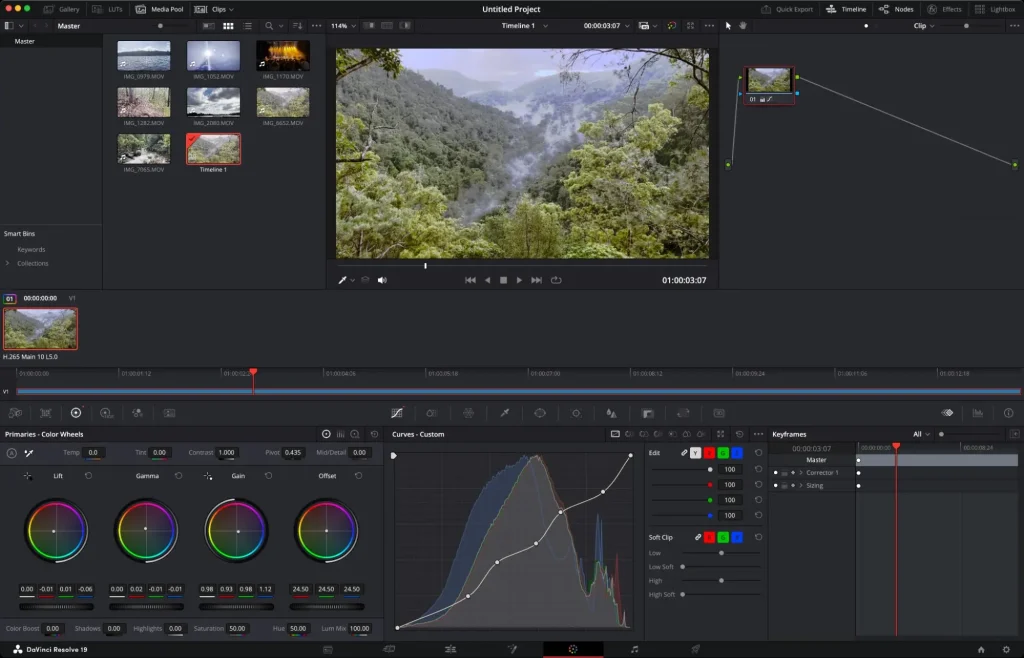
The interface is divided into dedicated workspaces, allowing creators to move between editing, color, audio, and delivery stages without switching applications. Multi camera editing, keyframing, advanced transitions, and detailed export control make it suitable for YouTubers, agencies, filmmakers, and marketing teams alike.
One of the strongest advantages of DaVinci Resolve is its depth. You can begin with simple cuts and gradually explore color grading panels, motion graphics, and audio refinement as your skills improve. The software supports high resolution exports and integrates directly with major publishing platforms.
For creators who are serious about building long term editing expertise, DaVinci Resolve offers exceptional value and scalability.
CapCut
CapCut has grown from a mobile first editor into a powerful desktop and web based solution that balances simplicity with surprising depth. Its interface is approachable, making it easy for beginners to start editing within minutes. At the same time, it includes features that appeal to more experienced creators.
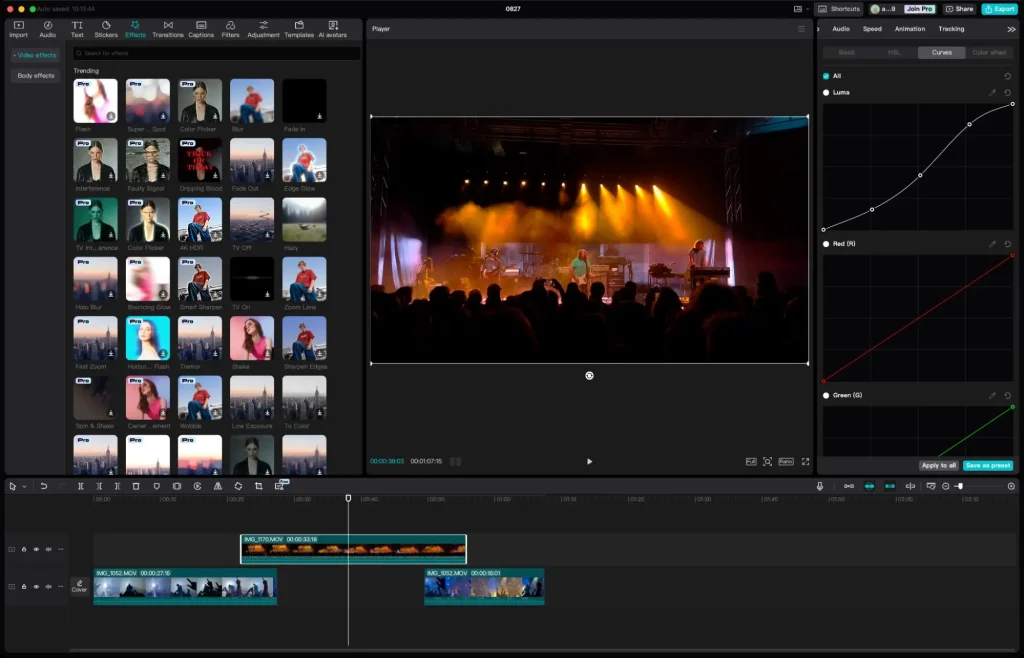
Drag and drop timelines, built in transitions, filters, and text animations make fast edits effortless. Text based editing allows users to modify video by editing transcriptions, which speeds up workflow for interviews and talking head content. Basic color adjustments and keyframe controls add flexibility without overwhelming new users.
CapCut also supports high resolution exports and multiple formats, making it suitable for social media creators who need flexibility across platforms. While some advanced features require paid access, the free version remains generous enough for most individual creators.
For content teams that prioritize speed, ease of use, and social first publishing, CapCut offers a balanced and accessible solution.
Adobe Premiere Rush
Adobe Premiere Rush is designed for creators who want to assemble videos quickly without dealing with complex timelines or technical setup. It focuses on speed and simplicity, making it especially useful for social media managers, marketers, and small teams that publish content frequently.
The workflow is straightforward. You select your clips, arrange them in order, and Premiere Rush automatically builds a basic sequence. From there, you can trim clips, adjust color, add titles, insert music, and fine tune audio levels. The single video track approach keeps the interface uncluttered, which is ideal for beginners or anyone who values efficiency over deep customization.

Premiere Rush also integrates well with the broader Adobe ecosystem. Creators who already use Photoshop, Illustrator, or Premiere Pro will find it familiar. Direct publishing to platforms like YouTube and Facebook reduces friction in the final stage of production.
The tradeoff is depth. Advanced features such as multicam editing, complex effects, and detailed color grading are not available. For quick edits and consistent output, Premiere Rush works well. For cinematic projects or layered storytelling, creators usually move to more advanced tools.
Clipchamp
Clipchamp has become one of the most capable browser based video editing tools available. It runs directly in modern browsers and offers a multi track timeline that feels closer to a desktop editor than most web apps.
Creators can trim clips, layer footage, detach audio, apply filters, add text, and insert transitions using an intuitive interface. Templates and an AI assisted auto editor help speed up production for users who prefer guided workflows. Clipchamp also includes access to a library of stock footage, images, and music, which is useful for marketing and social content.
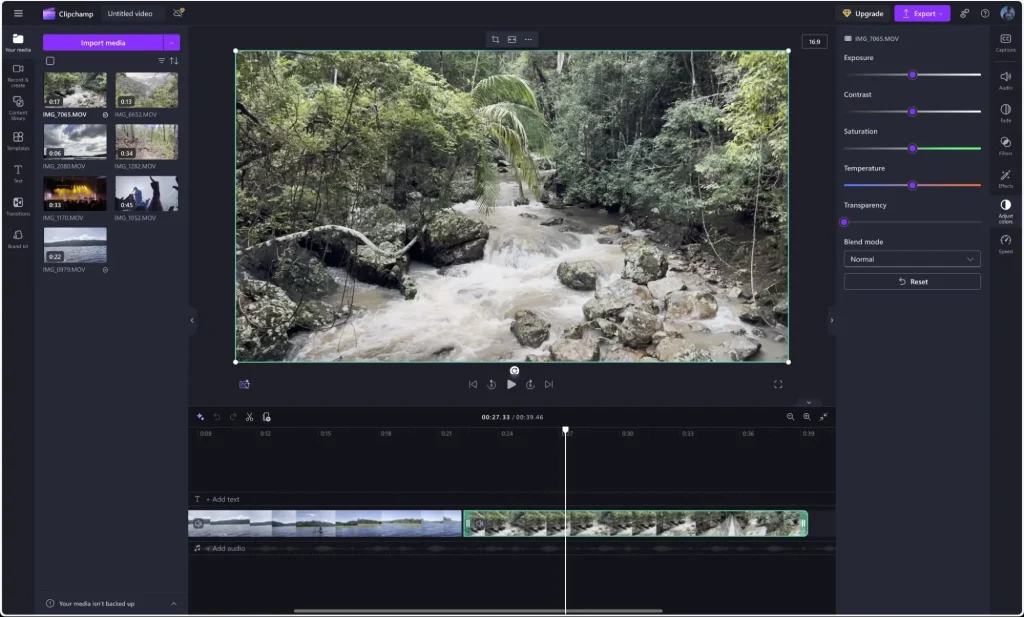
Because Clipchamp is web based, performance depends heavily on your internet connection and system resources. On stable connections and modern hardware, it performs surprisingly well. Export options include up to 1080p resolution and presets for major platforms.
Clipchamp is a strong choice for teams that value accessibility, quick collaboration, and lightweight editing without installing software.
iMovie
iMovie remains a reliable option for Apple users who want a simple yet capable video editor. Its tight integration with macOS, iOS, and iPadOS makes importing footage from iPhone and iPad seamless. Projects can be started on one device and continued on another, which fits well with mobile first workflows.

The interface is clean and easy to understand. Drag and drop editing, trimming, transitions, and titles are straightforward. iMovie also includes features such as stabilization, noise reduction, basic color correction, and green screen support.
Performance on Apple hardware is excellent, even on older systems. However, experienced editors may eventually find iMovie limiting due to restricted format options and fewer advanced controls.
For beginners, educators, and small teams within the Apple ecosystem, iMovie provides a dependable entry point into video editing.
Kdenlive
Kdenlive is a powerful open source video editor that supports Windows, macOS, and Linux. It offers a traditional multi track timeline and a wide range of effects, transitions, and advanced tools that rival many paid applications.

Creators can perform color grading, chroma keying, motion tracking, audio mixing, and detailed export customization. The interface is logical and customizable, allowing users to tailor the workspace to their preferences.
Kdenlive is especially appealing to creators who prefer open source software or want full control without subscription costs. While GPU acceleration support is still evolving, overall performance continues to improve with each release.
For users willing to invest time in learning, Kdenlive offers exceptional depth at no cost.
Free vs Paid Video Editing Software: How to Decide
Free video editing tools have become remarkably capable. Many creators can produce professional quality content without paying anything. However, paid upgrades become valuable as workflows grow more complex.
If you create content occasionally, free tools are usually sufficient. If you manage multiple channels, collaborate with teams, or produce client work, paid plans often save time through better performance, advanced features, and improved collaboration.
The decision should be based on workflow efficiency, not just feature lists. A tool that reduces friction and speeds up production can quickly justify its cost.
How Video Editing Fits Into a Scalable Content and Brand Workflow
Video files are not just creative outputs. They are brand assets. Thumbnails, intros, lower thirds, animations, and finished videos must remain consistent across campaigns and teams.
As organizations scale, managing these assets becomes just as important as creating them. Centralized storage, version control, and clear organization ensure that teams reuse approved elements rather than recreating everything from scratch.
This is where strong content operations and brand asset management practices make a measurable difference. Video editing software handles creation. A structured system ensures consistency, discoverability, and long term value.
Final Thoughts: Choosing a Video Editing Tool That Grows With You
There is no universal best video editing tool. The right choice depends on your experience level, content goals, and future plans.
Some creators need speed. Others need depth. Many need a balance of both.
Start with a tool that feels comfortable today but leaves room for growth tomorrow. Test a few options, pay attention to workflow friction, and choose the software that helps you create confidently and consistently.

