
In 2026, content planning is not a simple blog calendar with a few publish dates. One idea can turn into a search focused article, a short video script, a carousel, an email, a landing page update, and a sales enablement snippet that your team wants by Friday. Add multiple languages, multiple stakeholders, and faster turnarounds, and planning becomes the make or break system behind your marketing.
When planning breaks, you feel it everywhere. Teams lose visibility into what is coming next. Two people unknowingly create the same topic. Approvals happen too late, so publishing slips. Reporting becomes unclear, which makes it harder to prove impact and harder to defend budget.
A good content planning tool fixes this by doing more than storing dates. It connects strategy to execution. It gives your team a single source of truth for what you are creating, why you are creating it, who owns it, and what must happen before it goes live.
In this guide, I am covering ten of the best content planning tools for 2026, and I am also showing you how to choose the right one based on your real bottleneck, not the most hyped feature set.
What a Content Planning Tool Really Does in 2026?
Modern content planning tools act as operational hubs for content teams. They bring strategy, creation, collaboration, and scheduling into one structured system so content moves from idea to publication without constant back and forth.
At a high level, a strong content planning tool supports three connected functions: planning, publishing, and optimization.
Planning vs Publishing vs Optimization
Content planning controls everything before content reaches the world. This includes topic pipelines, briefs, assignments, deadlines, approval steps, channel mapping, and dependencies. If you publish across multiple channels, planning also defines repurposing rules so one asset can become several deliverables without recreating work.
Content publishing happens at the finish line. Publishing tools schedule posts and push content to platforms at the chosen time. Some also manage evergreen queues and basic engagement, but they execute the plan rather than define it.
Content optimization focuses on improving performance. SEO briefs, on page recommendations, content scoring, internal linking suggestions, and topic clustering influence what you plan next and how content is structured.
High performing teams connect these three into a loop where planning informs creation, creation feeds publishing, and performance data flows back into planning.
The Modern Must Haves
A content planning tool earns its place when it reduces coordination cost. It should provide a single calendar everyone trusts, repeatable workflows that match how your team works, and a clear approval system so nothing ships without the right checks.
In 2026, another requirement has become unavoidable: asset readiness. Planning fails when the final thumbnail, logo lockup, or product visual is missing at production time. This is where a brand asset system like Brandy strengthens your planning stack by giving teams instant access to approved files, templates, and guidelines.
When assets are easy to find and trustworthy, planning becomes reliable instead of fragile.
How to Choose the Right Content Planning Tool Without Overbuying?
Not every team needs an expensive all in one platform with dozens of unused features. The right tool is the one that solves your biggest workflow problem today and can scale as your operation grows.
Start With Your Bottleneck
Most teams buy the wrong tool because they purchase based on what they want to become, not how they actually work today. Start by identifying the pain that costs you the most time.
When approvals slow everything down, you need a tool with strong review workflows, comments, version history, and clear visibility into what is waiting on who.
When content keeps getting lost, a database style system works better than a simple calendar because it lets you track every asset, owner, status, and repurpose.
And if proving impact is difficult, choose a tool that connects planning to analytics or campaign reporting.
Solve the biggest pain first. Everything else becomes easier.
The Short Evaluation Checklist
When testing a tool, use one real campaign rather than a demo scenario.
- Check that you can plan across multiple channels.
- Confirm that content can be grouped into campaigns or themes.
- Make sure roles and permissions reflect your approval reality.
- Verify that assets can be attached or linked easily.
- Ensure it integrates with where you publish and where you store work.
If a tool fails any of these, it will eventually create friction.
Pricing Reality in 2026
Tool pricing is rarely about the sticker price. It is about scale. Some platforms charge per user. Others charge per social channel. Some charge per customer if you are an agency.
When comparing tools, calculate cost based on how you will actually use it in three months, not based on a perfect scenario today. A tool that looks cheap can become expensive quickly, while a higher priced tool can be cost effective if it replaces several others.
Top Content Planning Tools for 2026
These are the most effective platforms content teams rely on to plan calendars, collaborate on campaigns, and keep work moving from ideas to publish dates. Each tool has strengths that match different workflows and team sizes in 2026.
StoryChief

StoryChief is built for teams that want content planning and distribution to live in one connected workflow. Instead of planning in one tool and then moving drafts, assets, approvals, and publishing into several other places, StoryChief pushes toward a centralized content operation where strategy and execution stay linked.
Where it shines in planning is the combination of calendar visibility and collaborative production. You can plan campaigns, coordinate contributors, and move content through a review process without losing track of who owns the next step. This is useful when your marketing team creates content that must appear consistently across multiple channels and formats.
Pricing varies by plan and use case, including agency oriented options that price per customer. It is worth checking the current plan structure because StoryChief offers different tiers for teams, agencies, and enterprise needs.
CoSchedule

CoSchedule has been a long time favorite for teams that want a marketing calendar that feels like a command center. If your team’s main challenge is keeping work visible, keeping deadlines real, and keeping campaigns organized, CoSchedule is designed to solve that coordination layer.
For planning, the value is clarity. You get a unified view of what is scheduled, what is in progress, and what is overdue. It also supports campaign style planning, which helps when you want to tie blog, email, and social activity back to one initiative.
CoSchedule pricing depends on the product, and some plans are priced per user. If you are an agency, CoSchedule also lists an Agency Calendar option with a per user monthly price when billed annually.
Asana

Asana is not a publishing platform, but it is a strong planning tool when your real issue is workflow discipline. It is especially effective for content teams that need dependable ownership, clear deadlines, and a structured path from idea to done.
Asana works well when you create a content pipeline with defined stages, such as ideation, brief approved, drafting, editing, design, legal, scheduled, and published. You can also use calendar and timeline views to connect deliverables to launch dates, seasonal campaigns, and product milestones.
Asana is a great fit when you already have a separate scheduler for social and a separate CMS workflow for publishing, but you want one place where everyone agrees on what is happening next.
Airtable

Airtable is a top pick for teams that need a content system that behaves like a living database. It starts with a spreadsheet like feel, but it becomes much more powerful once you structure it around your content model.
For planning, Airtable helps you track every content item with fields that matter to your team. You can track target keyword, content type, channel, owner, due date, status, region, persona, and campaign tag. You can also create multiple views, such as a calendar for scheduling, a Kanban board for production, and a grid for reporting.
Airtable pricing varies by plan and team needs, so it is best treated as a flexible platform that can scale from simple to complex as your content operation grows.
Notion
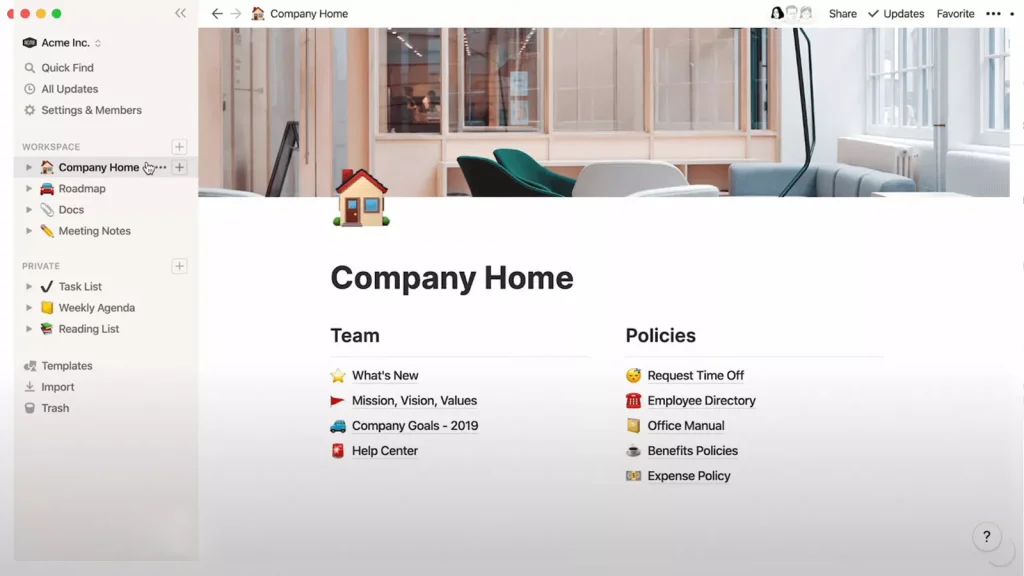
Notion is ideal when your team wants planning to live alongside documentation. Many content teams struggle because briefs are scattered, guidelines are buried, and decisions get lost. Notion solves this by combining docs, databases, and templates in one workspace.
For content planning, you can build an editorial calendar database, connect it to brief templates, add review checklists, and centralize your brand voice guidance. This is helpful for distributed teams because the context stays attached to the work, not trapped in message threads.
Notion does not publish content by itself for most workflows, but it plays well as the planning home when you pair it with a publishing tool for social or a CMS workflow for your website.
ClickUp
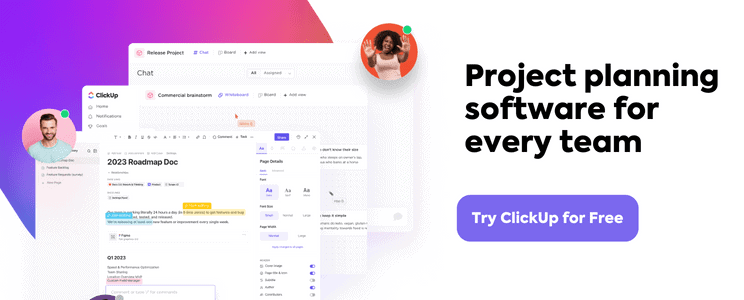
ClickUp is often described as an all in one productivity platform, but for content teams its real value lies in how deeply you can customize planning workflows. If your content operation includes many moving parts, such as writers, editors, designers, SEO specialists, and external collaborators, ClickUp gives you the structure to keep everything connected.
From a planning perspective, ClickUp allows you to create content pipelines with clear stages, assign owners, set due dates, and link related tasks together. You can view work as lists, boards, calendars, timelines, or dashboards depending on what each role prefers. This flexibility makes it easier to spot bottlenecks before they turn into missed deadlines.
ClickUp also includes built in documents, so your briefs, outlines, and editorial guidelines can live next to the tasks themselves. That reduces context switching and keeps everyone aligned on expectations.
ClickUp offers a free plan and several paid tiers. Pricing is typically seat based, so teams should calculate cost based on how many collaborators need full access.
Buffer

Buffer is best known as a social media scheduling tool, but it also plays an important role in content planning for teams that publish heavily on social channels.
The planning strength of Buffer comes from its visual publishing calendar. You can see what is scheduled for each platform, move posts around easily, and maintain a consistent cadence without guesswork. For many teams, this alone removes a large amount of daily friction.
Buffer is especially useful when paired with a separate planning hub like Notion, Airtable, or ClickUp. You plan campaigns and topics in your main system, then push approved social content into Buffer for scheduling.
Buffer pricing is based on the number of social channels connected and the features you need, which makes it accessible for small teams and scalable for growing brands.
Sprout Social

Sprout Social is a more advanced social media management platform designed for teams that need strong approvals, reporting, and collaboration around social content.
For planning, Sprout Social provides a centralized content calendar where teams can draft, review, approve, and schedule posts across multiple platforms. The approval workflows are particularly valuable for organizations where legal, brand, or leadership sign off is required before publishing.
Sprout Social also connects planning to performance through detailed analytics. This helps teams understand which types of posts perform best and adjust future plans based on real data rather than assumptions.
Sprout Social sits at a higher price point than basic schedulers, so it tends to fit mid sized and enterprise teams that depend heavily on social media as a core channel.
Surfer SEO

Surfer SEO is not a traditional calendar based planning tool, but it plays a critical role in content planning for SEO driven teams.
The tool helps you plan what to write and how to structure it. You can generate content briefs, analyze top ranking pages, and see recommended headings, topics, and keyword usage. This guidance feeds directly into your planning process because it clarifies which topics are worth pursuing and what level of depth is required.
Many teams use Surfer SEO alongside a project management or content calendar tool. The calendar handles timelines and ownership, while Surfer ensures the content itself is built to compete in search results.
If organic search is a major growth channel for you, Surfer SEO can dramatically improve the quality of your planning decisions.
Monday.com

Monday.com is a visual work management platform that many content teams use as their central planning hub.
It allows you to build custom boards for editorial calendars, campaign planning, content pipelines, and approvals. Each content item can include status, owner, due date, priority, channel, and campaign tags, giving you a clear picture of what is happening and what is stuck.
Monday.com works well for teams that want structure without heavy complexity. You can start simple and layer in automations, dashboards, and reporting as your operation grows.
Pricing is seat based, with multiple tiers depending on feature depth.
The Simple Stack That Works for Most Teams
Most teams do not need ten tools. They need a small, well chosen stack that covers three core areas: planning, publishing, and optimization.
For planning and production, choose one primary hub such as Notion, Airtable, ClickUp, or Asana. This becomes your source of truth for topics, briefs, owners, and deadlines.
For publishing, add a scheduler that matches your main channels. Social focused teams often use Buffer or Sprout Social. Blog heavy teams rely on their CMS plus internal workflows.
For optimization, add a tool like Surfer SEO if organic search is important, or use analytics platforms that show what content is driving results.
Finally, use Brandy to centralize brand assets and guidelines so every planned piece of content is built with consistent visuals and messaging.
How Brandy Strengthens Your Content Planning Stack?

Even the best content planning tools struggle with one hidden problem: brand assets.
When teams plan content, they assume the right logos, templates, product visuals, and brand guidelines will be available when production starts. In reality, creators waste hours searching drives, requesting files, or recreating assets that already exist.
Brandy solves this by giving teams a centralized brand portal where approved assets, templates, and guidelines live in one place.
Here is how Brandy supports content planning tools:
- Creators can pull approved visuals directly while working inside their planning workflow
- Designers upload final assets once, and everyone uses the same source
- Marketers stop guessing which logo version or template is correct
- External collaborators get controlled access to brand resources without messy file sharing
When brand assets are organized and accessible, your planning tools become more effective. Deadlines slip less often. Rework decreases. Content ships faster and looks consistent across channels.
Brandy does not replace your content planning tool. It makes every planning tool work better.
Final Thoughts
The best content planning tool is not the one with the longest feature list. It is the one that fits how your team actually works today and can scale as your operation grows.
Start by identifying your biggest bottleneck. Choose a tool that directly solves it. Then build a simple stack around that choice.
When planning, publishing, optimization, and brand assets are connected, content stops feeling chaotic and starts feeling intentional.
Frequently Asked Questions
A content calendar mainly shows publish dates. A content planning tool manages the full process, including ideas, briefs, owners, approvals, and performance insights.
Small teams can start with simple tools, but a dedicated planning system quickly pays off once publishing becomes consistent across channels.
Choose one primary planning hub and add only the tools that solve a clear problem, such as social scheduling or SEO optimization.
Some all in one platforms come close, but most teams get better results with a small stack of specialized tools that work well together.

