
SharePoint is one of the most widely deployed platforms in enterprise organizations. If your company runs on Microsoft 365, SharePoint is already part of your environment. It handles intranets, document libraries, wikis, and team collaboration. For IT teams, it is a flexible, powerful platform.
For brand teams, it is a different story.
This article covers what SharePoint can realistically do for brand asset management, where it consistently falls short, and what enterprise brand teams are using instead.
What SharePoint Can Do for Brand Asset Management?
SharePoint has several capabilities that make it a reasonable starting point for brand asset management in Microsoft-heavy organizations. Understanding what it does well is important before examining where it breaks down.
Document Libraries Handle the Basics
SharePoint’s document library supports all major file formats, version history, and metadata tagging. For a basic brand asset repository covering logos, fonts, and templates, a well-structured document library is functional. Files are stored securely, accessible across the organization, and versioned automatically.
For teams that need nothing more than organized file storage within their existing Microsoft 365 environment, this is a workable foundation.
Permissions are Genuinely Granular
SharePoint allows IT teams to configure detailed access controls at the site, library, folder, and file levels. For organizations with complex governance requirements, this flexibility is genuinely useful. Different departments, regions, and external parties can be given precisely scoped access when a SharePoint administrator configures it correctly.
This is one of SharePoint’s strongest capabilities and the main reason enterprise IT departments recommend it for sensitive asset storage.
Microsoft 365 Integration is Seamless
If your team lives in Teams, Outlook, and Office apps, having brand assets accessible within the same ecosystem reduces tool switching. Files stored in SharePoint appear in Teams channels, attach directly in Outlook without downloading, and open instantly in Office applications.
For organizations deeply invested in the Microsoft stack, this integration has real practical value.
Search Works When Tagging is Maintained
SharePoint’s search indexes metadata and content, enabling teams to find assets by keyword when they maintain consistent tagging practices. For organizations with a SharePoint administrator who enforces metadata standards, search can quickly surface the right asset.
These are real capabilities. For organizations that already have a SharePoint expert managing the environment, building a brand asset library there is a viable option in the short term.
Where SharePoint Falls Short for Brand Teams?
The limitations become clear when brand teams try to use SharePoint independently, without IT support. Each limitation is manageable in isolation. Together, they create a system that requires constant IT involvement to function properly for brand management.
Set Up requires IT Involvement
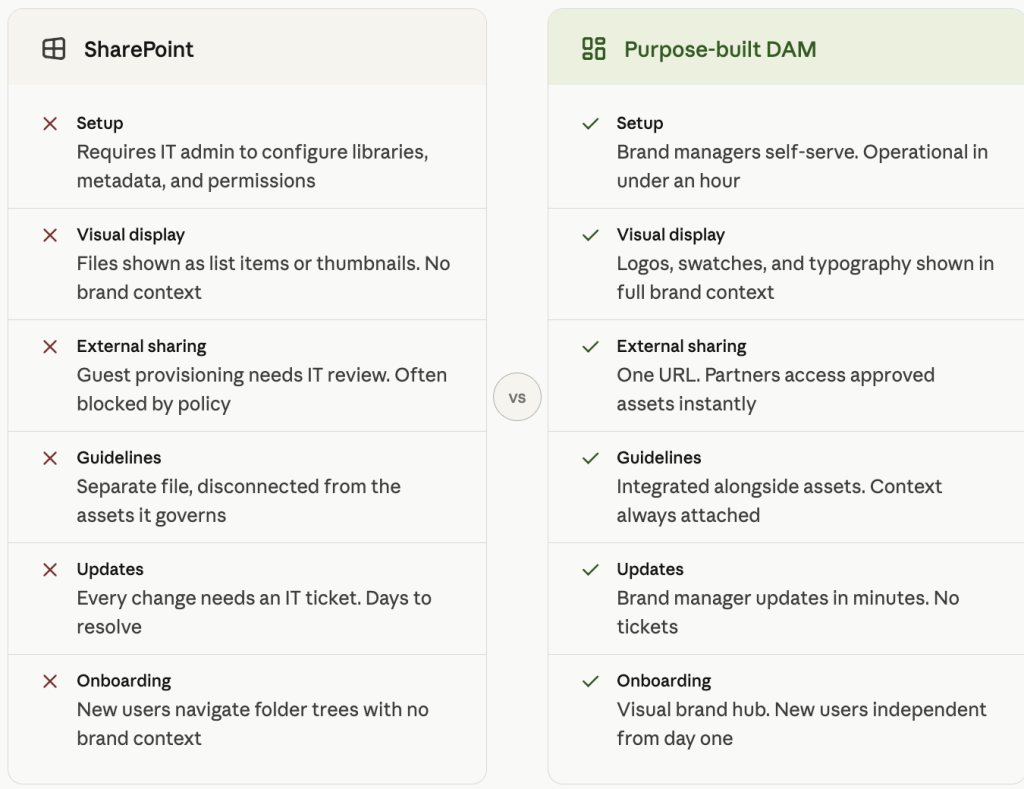
Creating a well-structured brand library in SharePoint means configuring document libraries, setting up metadata columns, managing permission levels, and often writing Power Automate flows for notifications and approval processes. None of this is accessible to a typical brand manager without IT assistance.
The result is that brand teams are dependent on IT from day one. Every structural change, every new client folder, every updated permission requirement goes through an IT queue. In large organizations, that queue has a wait time measured in days.
There is No Visual Brand Display
SharePoint displays files as list items or basic thumbnails. There is no way to show logos in visual context, display color swatches alongside their hex and RGB codes, or present typography as it actually renders. Brand assets in SharePoint appear as files because SharePoint treats them as such.
This creates a real problem for onboarding. A new designer joining the team, an agency being briefed on a client brand, or a partner needing to understand brand usage rules cannot get that understanding from a SharePoint library. They get a folder of files with no context.
External sharing is an IT and Security Conversation
Giving a vendor or agency partner access to brand assets in SharePoint requires either guest account provisioning or public link sharing. Both typically require IT review and often conflict with organizational policies that restrict external access for security reasons.
For enterprise organizations, this means a brand manager cannot independently share assets with a new agency without raising a ticket. In the time it takes to provision guest access, campaigns stall, and partners work from outdated files they already have.
Brand guidelines Are Disconnected from Assets
Your brand guidelines document lives in a separate file, sitting in a folder, unconnected to the assets it governs. A designer who downloads a logo from SharePoint has no direct access to the rules governing its use. The connection between the asset and guidance exists only if the person already knows to look for it.
In practice, most people do not look for it. Assets get used without context, and brand inconsistency follows.
Maintenance Depends on IT Response Times
When something breaks, permissions need updating, or a new library structure is required, brand teams are entirely dependent on IT response times. In large organizations, this means tickets, queues, and delays that have nothing to do with brand work and everything to do with IT capacity.
Brand managers end up managing both their brand responsibilities and a queue of IT requests to keep the system functional.
The Real Cost of Brand Management in SharePoint
The hidden cost of SharePoint as a brand management tool is the ongoing consumption of IT time and brand manager attention on tasks that should not require either.
The IT Time Cost
Every configuration change, permission update, external access request, and structural modification requires someone with SharePoint admin knowledge. For large organizations with dedicated SharePoint admins, this cost is absorbed into existing IT operations, but it is still a cost. For mid-size organizations, it means brand managers waiting on IT for tasks that should take minutes and frequently take days.
The Brand Consistency Cost
External stakeholders often struggle to navigate SharePoint libraries, so they ask someone to email the file. The file may be outdated or the wrong variant, which leads teams to produce off-brand materials with incorrect assets before anyone catches the mistake.
The cost of reprinting, the cost of correcting digital assets in circulation, and the reputational cost of inconsistent brand presentation are all real costs that SharePoint’s structural limitations make more likely.
What a Purpose-Built Tool Changes?
A brand asset management platform built specifically for brand governance eliminates these costs at the source. Brand managers control their own environment without IT involvement. External sharing is a URL, not a ticket. Assets are organized visually with context attached, not buried in folder hierarchies that require a map to navigate.
The time brand managers spend managing SharePoint is time they are not spending on brand work.
SharePoint for Government Brand Management
SharePoint is deeply embedded in US government environments. DoD, Army, Navy, Air Force, and federal civilian agencies all operate on Microsoft 365, and SharePoint is a standard component of that environment. Government brand management faces all the limitations outlined above, compounded by factors unique to the public sector.

The Government-Specific Challenge
Government brand teams face the same structural limitations as commercial organizations, but with stricter security requirements and significantly longer IT procurement and change cycles. A structural change that takes a week in a commercial SharePoint environment can take months in a government one.
External sharing with contractors, communications partners, and public affairs vendors is especially constrained. Guest access provisioning in a government Microsoft 365 tenant involves security reviews that can extend the timeline from days to weeks.
Brandy Through Carahsoft
Brandy is available through Carahsoft, the trusted US government IT distributor. This means government brand teams can procure Brandy through existing government purchasing channels, with the compliance and procurement structures required for government acquisition. The process does not require a new vendor relationship or a separate procurement pathway.
For government agencies looking to modernize brand asset management without replacing their broader Microsoft 365 environment, Brandy serves as a dedicated brand management layer that sits alongside SharePoint rather than replacing it. SharePoint continues to handle document management and internal collaboration. Brandy handles the brand-specific function for which it was designed.
What Enterprise Brand Teams Use Instead?
Enterprise brand teams that move beyond SharePoint for brand management typically take one of two paths. Understanding both helps in choosing the right solution for a specific organization’s needs.
Full Enterprise DAM Platforms
Full enterprise DAM platforms like Bynder, Canto, and Brandfolder are built for large organizations managing thousands of assets across complex, multi-team workflows. They offer sophisticated metadata management, rights and license tracking, workflow automation, and integrations with the full creative and marketing technology stack.
They are powerful and priced accordingly. Enterprise DAM contracts typically start at several hundred dollars per month and scale significantly with storage, users, and features. Implementation is measured in months, not hours, and typically requires dedicated project management.
For organizations managing thousands of brand and marketing assets across global teams with complex governance requirements, that investment is justified. For organizations that primarily need to store, organize, and share brand identity assets, the platform is more than they need.
Brandy: Purpose-Built Brand Management
Brandy operates in white-label brand management and enterprise governance without the complexity or cost of a full DAM platform. It is purpose-built brand asset management for agencies, growing enterprise teams, and organizations that need real governance without a six-month implementation project.
Enterprise plans include unlimited brand spaces, role-based access control, SOC 2 Type II compliance, SSO integration, and white-label capabilities for agencies managing client brands under their own identity.
The key operational difference from SharePoint is that brand teams own and manage Brandy themselves. No IT involvement is required to create a brand space, upload assets, set permissions, or share with external partners. Every task that takes an IT ticket in SharePoint takes minutes in Brandy.
How to Transition from SharePoint to Brandy?
Transitioning brand assets from SharePoint to Brandy does not require a full migration project or a cutover date. Most teams run both platforms in parallel during the transition, keeping disruption to active work to a minimum.
Step 1: Build Your Brand Space
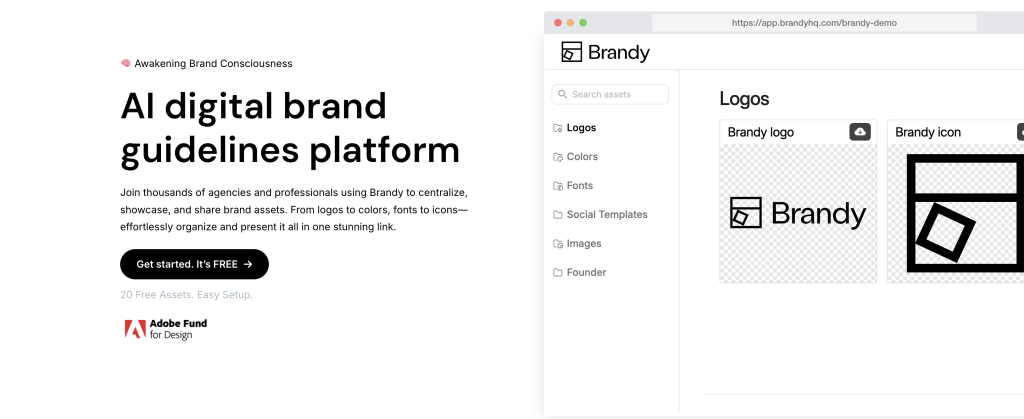
Start by creating your brand space in Brandy and uploading your core brand assets: logos in all formats, color references with complete values, typography files, and your brand guidelines document. For a single brand, this typically takes less than an hour. The brand space is immediately shareable via URL once assets are uploaded.
Step 2: Shift External Sharing First
Share the Brandy brand space URL with internal stakeholders and key external partners. Agencies, vendors, and contractors who previously requested assets through SharePoint or email now have a permanent, self-serve link. As people start using the Brandy URL for brand asset requests, traffic to the SharePoint library naturally decreases without requiring a formal deprecation.
Step 3: Migrate Brands One At a Time
For agencies managing multiple client brands in SharePoint, Brandy’s unlimited brand spaces allow migration client by client, at whatever pace works for active project timelines. You do not need to migrate all brands at the same time, and client relationships remain uninterrupted for brands that have not yet been moved.
Enterprise Onboarding Support
Enterprise customers receive white-glove onboarding support throughout the transition. Brandy’s team works directly with brand managers to structure brand spaces, configure permissions, and set up the environment to meet the organization’s governance requirements before any formal migration from SharePoint begins.
Final Thoughts
SharePoint can work for brand asset management in organizations that already have the IT infrastructure to support it well. For those organizations, it is a reasonable starting point and a defensible choice given the existing Microsoft investment.
But it was not built for brand management. The setup complexity, external sharing friction, and absence of visual brand presentation create ongoing costs for brand teams that a purpose-built tool eliminates from day one.
Brandy is available to enterprise teams via direct subscription and to government teams via Carahsoft. Start with a free brand space and see how it compares to what your team is managing in SharePoint today.
Managing brand assets in SharePoint? See how Brandy simplifies brand governance for enterprise teams, no IT required. Start Free
Related reading: Brandy vs SharePoint for a full feature comparison side by side.

